
.png?width=64&height=64&name=header%20product%20icons%20%20(9).png)
.png?width=64&height=64&name=header%20product%20icons%20%20(1).png)
.png?width=64&height=68&name=header%20product%20icons%20%20(2).png)
.png?width=64&height=64&name=header%20product%20icons%20%20(5).png)
.png?width=64&height=64&name=header%20product%20icons%20%20(4).png)
.png?width=64&height=64&name=header%20product%20icons%20%20(3).png)
.png?width=64&height=64&name=header%20product%20icons%20%20(11).png)
.png?width=64&height=64&name=header%20product%20icons%20%20(10).png)
.png?width=64&height=64&name=header%20product%20icons%20%20(6).png)
.png?width=64&height=64&name=header%20product%20icons%20%20(12).png)
.png?width=64&height=65&name=header%20product%20icons%20%20(28).png)
.png?width=64&height=64&name=header%20product%20icons%20%20(30).png)
.png?width=64&height=64&name=header%20product%20icons%20%20(13).png)
.png?width=64&height=64&name=header%20product%20icons%20%20(15).png)
.png?width=64&height=64&name=header%20product%20icons%20%20(14).png)
.png?width=156&height=156&name=header%20product%20icons%20%20(44).png)
.png?width=64&height=64&name=header%20product%20icons%20%20(16).png)
.png?width=64&height=64&name=header%20product%20icons%20%20(19).png)
.png?width=64&height=64&name=header%20product%20icons%20%20(17).png)
.png?width=64&height=64&name=header%20product%20icons%20%20(18).png)
.png?width=64&height=64&name=header%20product%20icons%20%20(20).png)
.png?width=64&height=64&name=header%20product%20icons%20%20(21).png)
.png?width=64&height=64&name=header%20product%20icons%20%20(24).png)
.png?width=64&height=64&name=header%20product%20icons%20%20(26).png)
.png?width=64&height=64&name=header%20product%20icons%20%20(23).png)
.png?width=64&height=64&name=header%20product%20icons%20%20(22).png)
.png?width=64&height=64&name=header%20product%20icons%20%20(25).png)
.png?width=64&height=64&name=header%20product%20icons%20%20(27).png)
 By
·
2 minute read
By
·
2 minute read
Easier synchronization setup
Your data speaks volumes, but the whole story is almost never available in a single dashboard. That’s why we’ve given special attention to improving the connection between dimensions in the dashboard synchronizer and the global synchronizer, so that it’s easier to move back and forth between dashboards while maintaining focus on the specific aspect you’re investigating.
In the dashboard synchronization Mappings menu, you’ll find three new buttons that control how the dimensions in the mapping react to the global synchronizer.
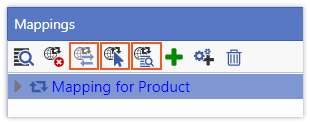
Force Selection Synchronization and Pointer Synchronization Only
If you have multiple dashboards that you want to synchronize using a global synchronizer, you can now apply selection synchronization for a dimension on some dashboards and just pointer synchronization on others. No more complex workarounds are required to achieve this.
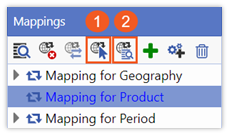
You determine how you want the dimensions to synchronize in the Mappings toolbar of the dashboard synchronizer by picking either the Pointer synchronization only (1) or Force selection synchronization (2) toggle buttons.
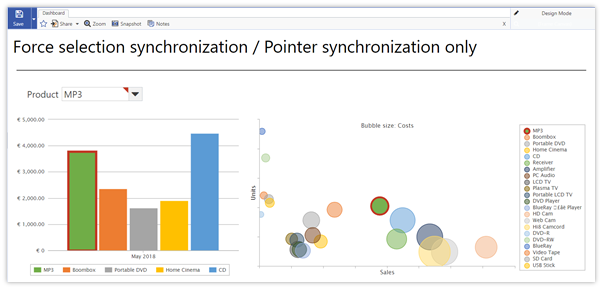
Below is an example of Force selection synchronization and Pointer synchronization only applied to different reports on the same dashboard. At the top, you have the global synchronizer pager with a selection of 5 products. The chart on the left has Force selection synchronization applied to the Product dimension, so it shows the same selection as the global synchronizer and, by default, the same pointer (MP3). The chart on the right only shows the same pointer, but a different selection as it has Pointer synchronization only applied to it. 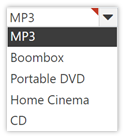
Two-way synchronization between dashboard synchronizer mappings and global synchronizer mappings
If you’ve had issues with syncing a global synchronizer with reports on a dashboard that contain links to other reports or dashboards, you’ll be happy with the new Two-way pointer synchronization button also found in the Mappings Toolbar.
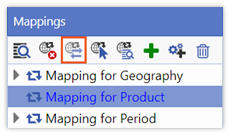
Activating the Two-way pointer synchronization button means that the pointer is not only pushed from the global synchronizer to the dashboard dimension, but also from the dashboard dimension to the global synchronizer. This is particularly valuable when you have a dashboard that contains a report with a hotlink to another dashboard. The target dashboard will open with the same active pointer, which means no more errors when using a global synchronizer and table or chart hotlinks and no need to set the active pointers for the hotlink in the Actions dialog.
Below is an example of Two-way pointer synchronization applied to the Product dimension. When you click on a product in the bars of the bar chart or the bubbles of the bubble chart to pick a product and make it the active pointer (e.g., Boombox), it is reflected in the global synchronizer on this dashboard and, in turn, on any other open dashboards.
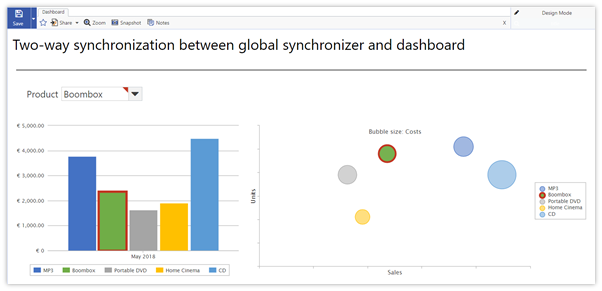
New functions to make navigating between dashboards, while keeping the same focus on the specific aspect you’re investigating, easier and less error-prone.
Want to Know More?
If you are already using MarketingTracker, you can log into the Knowledge Base to read the full release notes and find other learning resources such as videos and quick reference documents.
If you are not using MarketingTracker yet, but you are interested in learning more, you can read our product factsheet and request a demo here.